
1.5 KiB
@defgroup boards_esp32s2-wemos-mini Wemos S2 mini Board @ingroup boards_esp32s2 @brief Support for Wemos S2 mini Board @author Benjamin Valentin benjamin.valentin@ml-pa.com
\section esp32s2-wemos-mini Wemos S2 mini
Overview
\image html "https://www.wemos.cc/en/latest/_images/s2_mini_v1.0.0_4_16x9.jpg" "Wemos S2 mini" width=600px
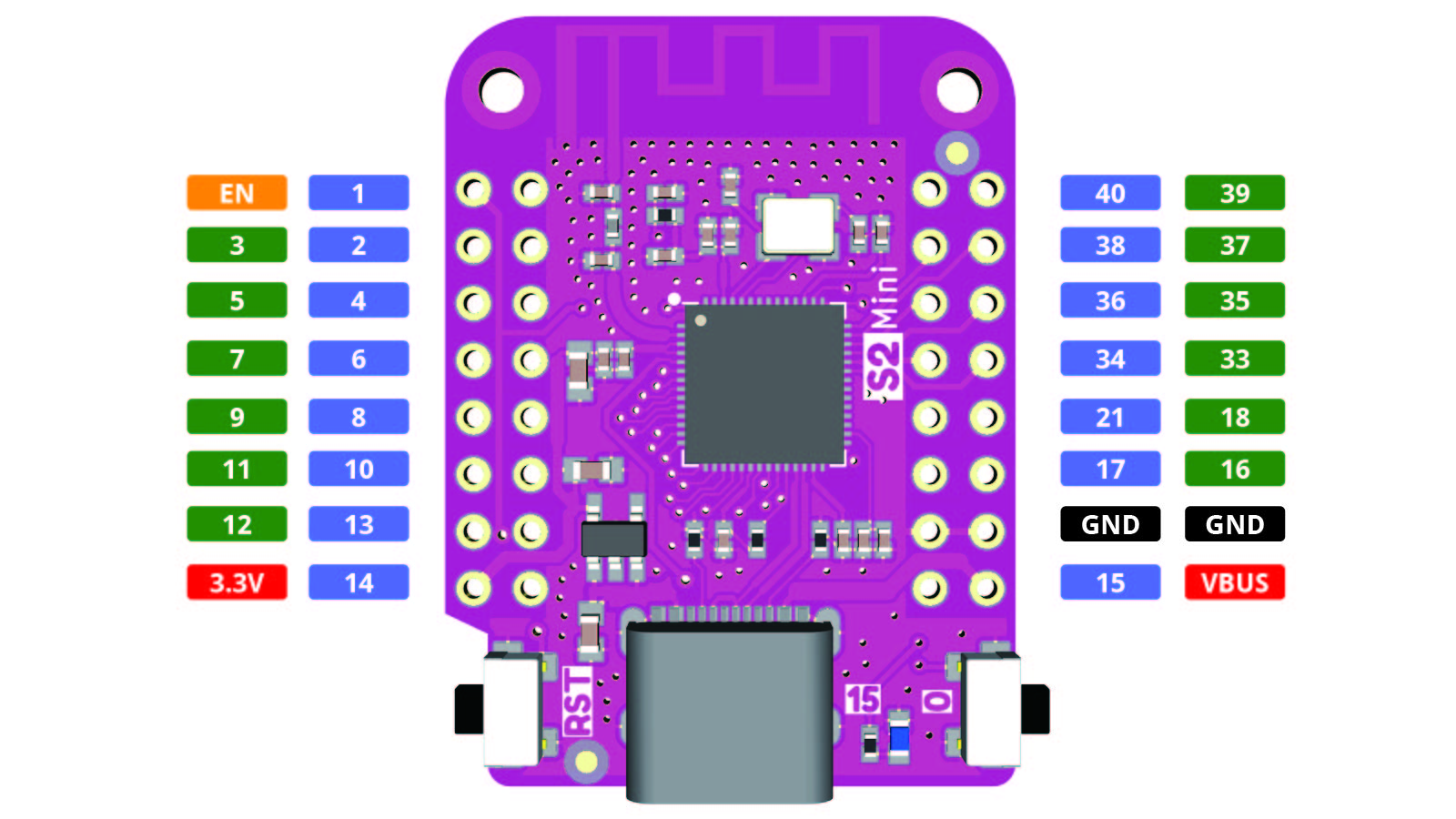
Documentation for the board can be found on the vendor page:
Flashing the Device
Flashing RIOT is quite easy. The board has a Micro-USB connector with reset/boot/flash logic. Just connect the board to your host computer and type using the programming port:
BOARD=esp32s2-wemos-mini make flash
If RIOT is already on the device, it should automatically enter bootloader mode. If this does not work or the device is stuck in some other mode, you can force it into bootloader mode by pressing the Reset (RST) button while holding the BOOT (0) button.
For detailed information about ESP32-S2 as well as configuring and compiling RIOT for ESP32-S2 boards, see \ref esp32_riot.