
9.7 KiB
@defgroup boards_stm32f4discovery STM32F4Discovery @ingroup boards @brief Support for the STM32F4Discovery board
Overview
See this page for a quick getting started guide.
Hardware
MCU
| MCU | STM32F407VGT6 |
|---|---|
| Family | ARM Cortex-M4 |
| Vendor | ST Microelectronics |
| Package | LQFP100 |
| RAM | 192 KiB (128 KiB RAM + 64 KiB CCMRAM) |
| Flash | 1024 KiB |
| Frequency | up to 168 MHz |
| FPU | yes |
| Timers | 14 (12× 16bit, 2× 32bit [TIM2 + TIM5]) |
| ADCs | 3× 16 channel 6 to 12-bit |
| UARTs | 6 |
| SPIs | 3 |
| I2Cs | 3 |
| Vcc | 2.0 V - 3.6 V |
| MCU Datasheet | MCU Datasheet |
| Reference Manual | Reference Manual |
| Programming Manual | Programming Manual |
| Board Manual | Board Manual |
Flashing
After connecting the board to your computer using the Mini USB port, cd to
the directory of the app you intend to flash and run:
make BOARD=stm32f4discovery flash
@note You will need to have OpenOCD installed, e.g. sudo apt install openocd
STDIO
By default, STDIO is implemented via the native USB interface.
Using USB
Connect your computer via the micro USB connector to the board. (It is safe to connect both the native USB port of the MCU at the micro USB connector and the ST-Link programmer/debugger at the mini USB connector at the same time.)
Afterwards, simply run (with the current working directory of your terminal set to directory of the app you flashed):
make BOARD=stm32f4discovery term
Using UART
Connect your USB to UART bridge as follows:
| Pin UART Adapter | Pin Board |
|---|---|
| TXD | RXD (PA3) |
| RXD | TXD (PA2) |
| GND | GND |
Now flash with stdio over UART by selecting the module stdio_uart and connect
to the serial. You can do both by running in a terminal (and the working
directory set to the directory of the app you want to run):
USEMODULE=stdio_uart make BOARD=stm32f4discovery flash term
@note The USEMODULE=stdio needs to be specified before the make command
to pass it as environment variable.
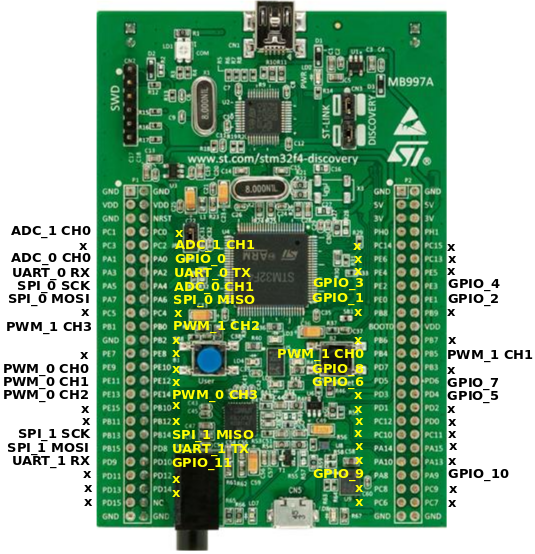
RIOT pin mapping
Please refer to this document for the RIOTs pin
mapping for the stm32f4discovery board. The pin mapping is chosen completely
arbitrary and can be altered by editing the
boards/stm32f4discovery/include/periph_conf.h header file.
User Interface
2 Buttons:
| NAME | USER | RESET |
|---|---|---|
| Pin | PA0 (IN) | NRST |
6 User controllable LEDs:
| NAME | LD3 | LD4 | LD5 | LD6 | LD7 | LD8 |
|---|---|---|---|---|---|---|
| Color | orange | green | red | blue | green | red |
| Pin | PD13 | PD12 | PD14 | PD15 | PA9 | PD5 |
LEDs LD7 and LD8 are used by the USB connector for over-current (LD8) and data (LD7) indication.
USB Device Interface
The board has a micro USB port that can be used for USB device mode. As the ST-Link on the board does not provide a USB-UART interface, the STDIO is mapped to the micro USB port by default (via CDC ACM).
Accelerometer
The STM32F4discovery board contains a 3-axis MEMS accelerometer that can sample with up to 1.6kHz.
| Sensor | LIS3DSH |
|---|---|
| Type | Accelerometer |
| Vendor | ST Microelectronics |
| Datasheet | Datasheet |
Pin Config:
| Pin / Bus | Function |
|---|---|
| SPI bus (RIOT) | SPI_DEV(0) |
| SPI bus (hardware) | SPI1 |
| SCK | PA5 (OUT, SPI1_SCK) |
| MISO | PA6 (IN, SPI1_MISO) |
| MOSI | PA7 (OUT, SPI1_MOSI) |
| INT1 | PE0 (IN) |
| INT2 | PE1 (IN) |
| CS | PE3 (OUT) |
Digital Microphone
The STM32F4discovery board contains a on-board MEMS audio sensor.
| Sensor | MP45DT02 |
|---|---|
| Type | Audio sensor |
| Vendor | ST Microelectronics |
| Datasheet | Datasheet |
Pin Config:
| Pin / Interface | Function |
|---|---|
| I2S interface (hardware) | I2S2 |
| I2S interface (RIOT) | n/a |
| CLK | PB10 |
| DOUT | PC3 |
Audio DAC with integrated class D speaker driver
The board contains an digital analog converter (DAC) with integrated class D speaker driver.
| Device | CS43L22 |
|---|---|
| Type | DAC |
| Vendor | Cirrus Logic |
| Datasheet | Datasheet |
Pin Config:
| Pin / Interface / Bus | Function |
|---|---|
| Analog (hardware) | DAC1 |
| Analog (RIOT) | DAC_LINE(0) |
| I2S interface (hardware) | I2S3 |
| I2S interface (RIOT) | n/a |
| I2C bus (hardware) | I2C1 |
| I2C bus (RIOT) | I2C_BUS(0) |
| AIN1 | PA4 (DAC1_OUT) |
| SCL | PB6 (I2C1_SCL) |
| SDA | PB9 (I2C1_SDA) |
| MCLK | PC7 (I2S3_MCK) |
| SCLK | PC10 (I2S3_CK) |
| SDIN | PC12 (I2S3_SD) |
| RESET | PD4 (OUT) |
Supported Toolchains
For using the STM32F4discovery board we strongly recommend the usage of the GNU Tools for ARM Embedded Processors toolchain.
Alternative way to flash
Using openocd to flash the RIOT binary to the board
- Compile your code to have a .hex file
- Connect the board with the mini usb cable, on the debugger side to your PC
- run openocd with
$ sudo /usr/local/bin/openocd -f interface/stlink-v2.cfg -f target/stm32f4x_stlink.cfg - in a new terminal connect:
telnet 127.0.0.1 4444 - run:
> flash banks
#0 : stm32f4x.flash (stm32f2x) at 0x08000000, size 0x00100000, buswidth 0,
chipwidth 0

> halt
target state: halted
target halted due to debug-request, current mode: Thread
xPSR: 0x21000000 pc: 0x0800251a msp: 0x20000c4c

> flash write_image erase unlock /home/c/git/RIOT-
OS/RIOT/examples/ipc_pingpong/bin/stm32f4discovery/ipc_pingpong.hex 0
auto erase enabled
auto unlock enabled
target state: halted
target halted due to breakpoint, current mode: Thread
xPSR: 0x61000000 pc: 0x20000042 msp: 0x20000c4c
wrote 16384 bytes from file /home/c/git/RIOT-
OS/RIOT/examples/ipc_pingpong/bin/stm32f4discovery/ipc_pingpong.hex in 1.200528s
(13.327 KiB/s)

> reset
The board is now flashed with your RIOT binary
Emulator
To emulate this board you need an updated version of renode installed, at least version 1.11.
EMULATE=1 BOARD=stm32f4discovery make all term
Known Issues / Problems
I2C
When connecting an I2C device and a logic analyzer to an I2C port at the same time, the internal pull-up resistors are not sufficient for stable bus operation. You probably have to connect external pull-ups to both bus lines. 10K is a good value to start with.
macOS & make term
If you want the terminal to work using make term command and get a message
about missing tty device install the driver from
https://www.silabs.com/products/development-tools/software/usb-to-uart-bridge-vcp-drivers .