
7.9 KiB
@defgroup boards_arduino_nano_esp32 Arduino Nano ESP32 @ingroup boards @ingroup boards_esp32s3 @brief Support for the Arduino Nano ESP32 board @author Gunar Schorcht gunar@schorcht.net
\section arduino_nano_esp32 Arduino Nano ESP32
Table of Contents
-# Overview -# Hardware -# MCU -# Board Configuration -# Board Pinout -# Flashing the Device -# Using STDIO
Overview
The Arduino Nano ESP32 is an ESP32-S3 board in Arduino Nano format that uses the u-Blox NORA-W106 module. @image html https://store.arduino.cc/cdn/shop/files/ABX00092_00.default_643x483.jpg "Arduino Nano ESP32" width=400px
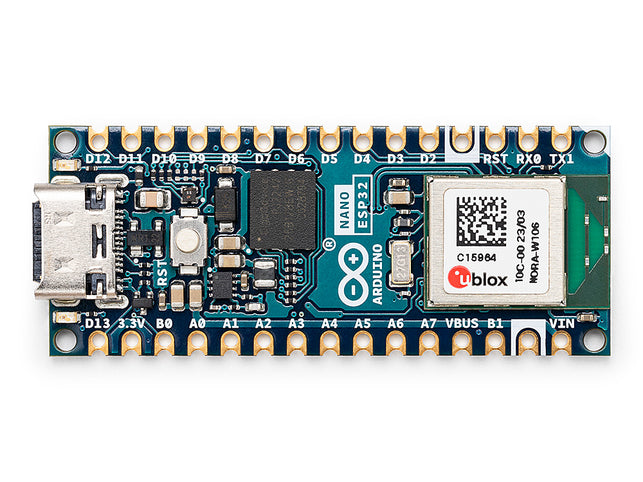
The main features of the board are:
- ESP32-S3 SoC with 2.4 GHz WiFi 802.11b/g/n and Bluetooth5, BLE
- 8 MByte embedded QSPI RAM
- 16 MByte Flash
- RGB LED with separate colour LEDs
- Native USB and USB Serial JTAG
Hardware
This section describes
- the MCU,
- the default board configuration,
- the board pinout.
MCU
Most features of the board are provided by the ESP32-S3 SoC. For detailed information about the ESP32-S3 SoC variant (family) and ESP32x SoCs, see section \ref esp32_mcu_esp32 "ESP32 SoC Series".
Board Configuration
Arduino Nano ESP32 boards have no special hardware on board with the exception of an RGB-LED with separate LEDs for each color.
The board configuration provides:
- 8 x ADC channels (4 x ADC channels if module
periph_i2cis used) - 1 x SPI
- 1 x I2C
- 1 x UART
- 2 x PWM (4 channels on PWM_DEV(0), 3 RGB LED channels on PWM_DEV(1))
The following table shows the default board configuration, which is sorted according to the defined functionality of GPIOs. This configuration can be overridden by \ref esp32_application_specific_configurations "application-specific configurations".
Function | GPIOs | Remarks | Configuration :---------------|:-------|:--------|:---------------------------------- ADC_LINE(0) | GPIO1 | | \ref esp32_adc_channels "ADC Channels" ADC_LINE(1) | GPIO2 | | \ref esp32_adc_channels "ADC Channels" ADC_LINE(2) | GPIO3 | | \ref esp32_adc_channels "ADC Channels" ADC_LINE(3) | GPIO4 | | \ref esp32_adc_channels "ADC Channels" ADC_LINE(4) | GPIO11 | N/A if `periph_i2c` is used | \ref esp32_adc_channels "ADC Channels" ADC_LINE(5) | GPIO12 | N/A if `periph_i2c` is used | \ref esp32_adc_channels "ADC Channels" ADC_LINE(6) | GPIO13 | N/A if `periph_i2c` is used | \ref esp32_adc_channels "ADC Channels" ADC_LINE(7) | GPIO14 | N/A if `periph_i2c` is used | \ref esp32_adc_channels "ADC Channels" PWM_DEV(0):0 | GPIO6 | | \ref esp32_pwm_channels "PWM Channels" PWM_DEV(0):1 | GPIO8 | | \ref esp32_pwm_channels "PWM Channels" PWM_DEV(0):2 | GPIO9 | | \ref esp32_pwm_channels "PWM Channels" PWM_DEV(0):3 | GPIO18 | | \ref esp32_pwm_channels "PWM Channels" PWM_DEV(1):0 | GPIO46 | LED red | \ref esp32_pwm_channels "PWM Channels" PWM_DEV(1):1 | GPIO0 | LED green | \ref esp32_pwm_channels "PWM Channels" PWM_DEV(1):2 | GPIO45 | LED blue | \ref esp32_pwm_channels "PWM Channels" I2C_DEV(0):SCL | GPIO12 | | \ref esp32_i2c_interfaces "I2C Interfaces" I2C_DEV(0):SDA | GPIO11 | | \ref esp32_i2c_interfaces "I2C Interfaces" SPI_DEV(0):CLK | GPIO48 | SPI2_HOST (FSPI) is used | \ref esp32_spi_interfaces "SPI Interfaces" SPI_DEV(0):MISO | GPIO47 | SPI2_HOST (FSPI) is used | \ref esp32_spi_interfaces "SPI Interfaces" SPI_DEV(0):MOSI | GPIO38 | SPI2_HOST (FSPI) is used | \ref esp32_spi_interfaces "SPI Interfaces" SPI_DEV(0):CS0 | GPIO21 | SPI2_HOST (FSPI) is used | \ref esp32_spi_interfaces "SPI Interfaces" UART_DEV(0):TxD | GPIO43 | Console (fixed) | \ref esp32_uart_interfaces "UART interfaces" UART_DEV(0):RxD | GPIO44 | Console (fixed) | \ref esp32_uart_interfaces "UART interfaces" \nFor detailed information about the peripheral configurations of ESP32-S3 boards, see section \ref esp32_peripherals "Common Peripherals".
Board Pinout
The following figure shows the pinout as configured by board definition.
@image html https://edistechlab.com/wp-content/uploads/2023/11/Pinout_arduino_nano_esp32.png "Arduino Nano ESP32 Pinout" width=600px

An advanced pinout version with front view, back view and some additional information can be found here. The corresponding board schematic can be found here.
Flashing the Device
Since the board does not have a USB-to-Serial chip, the easiest way to flash the board is using the USB Serial/JTAG interface. Just connect the board to your host computer and use the following command:
BOARD=arduino-nano-esp32 make flash ...
@note Usually the make system resets the board before flashing to enable the USB Serial/JTAG interface. In some special cases this reset does not work so that the programmer cannot connect to the board and the flashing is aborted with a timeout:
Serial port /dev/ttyACM0
Connecting...
...
serial.serialutil.SerialTimeoutException: Write timeout
This can happen for example if the board is not yet flashed with RIOT or the USB interface is used for another purpose. In this case, restart the board manually in download mode by pressing and releasing the RESET button while pulling down the GPIO0 (B1) pin. In download mode, the USB Serial/JTAG interface is always available.
Alternatively, an external USB-to-Serial adapter can be used. In this case, the USB-to-Serial adapter has to be connected to TxD (GPIO43) and RxD (GPIO44) of the UART0 interface. Before RIOT can be flashed, the board has also to be switched to download mode. To do this, press and release the RESET button while pulling down the GPIO0 (B1) pin. Once the board is in download mode, use the following command to flash RIOT:
BOARD=arduino-nano-esp32 make flash ...
For detailed information about ESP32-S3 as well as configuring and compiling RIOT for ESP32-S3 boards, see \ref esp32_riot.
Using STDIO
Since the board does not have a USB-to-Serial chip, the USB Serial/JTAG
interface is used by default for the STDIO (module stdio_usb_serial_jtag)
which provides an USB CDC ACM interface.
If the USB port is used by the USBUS stack or the tinyUSB stack, implicitly
the module stdio_cdc_acm or stdio_tinyusb_cdc_acm is used for the STDIO
via the USB CDC ACM interface.
Alternatively, the UART interface could be used with an external USB-to-Serial
adapter. Simply add stdio_uart to the list of used modules for this purpose:
BOARD=arduino-nano-esp32 USEMODULE=stdio_uart make flash ...