
10 KiB
@defgroup boards_esp32_heltec-lora32-v2 Heltec WiFi LoRa 32 V2 boards @ingroup boards_esp32 @brief Support for Heltec WiFi LoRa 32 V2 boards @author Gunar Schorcht gunar@schorcht.net
\section esp32_heltec_lora32_v2 Heltec WiFi LoRa 32 V2
Table of Contents
Overview
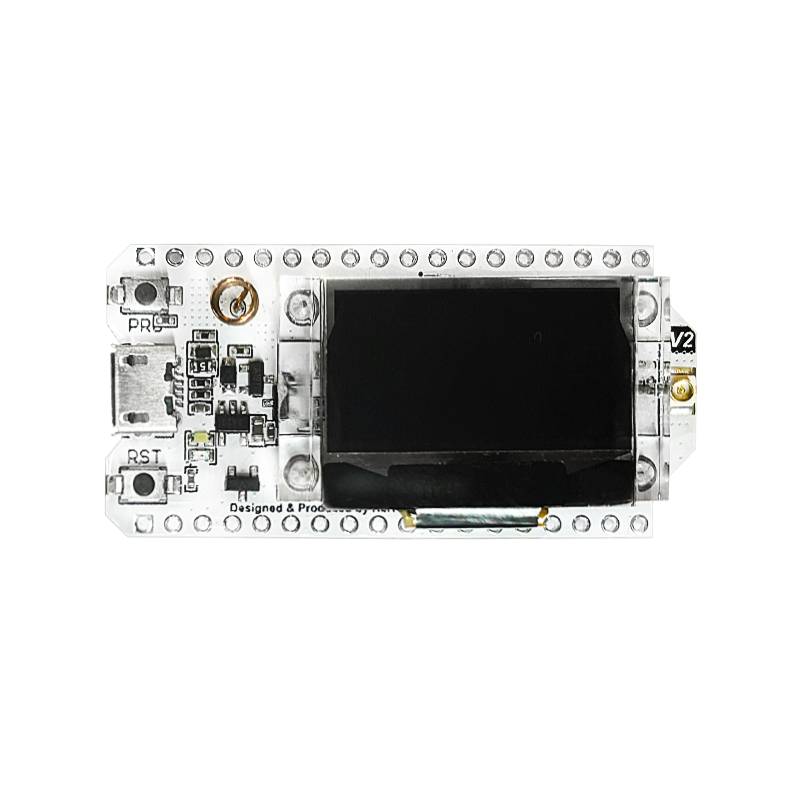
Heltec WiFi LoRa 32 V2 is an ESP32 development board with 8 MB Flash that uses the EPS32 chip directly. It integrates
- a SemTech SX1276 or SX1278 for LoRaWAN communication and
- a SSD1306 0.96-inch 128x64 OLED display connected via I2C.
Since the board is open source hardware, a number of clones are available.
@image html "https://heltec.org/wp-content/uploads/2024/07/wifi-lora-32-v2-1.png" "Heltec WiFi Lora 32 V2" width=400px
Hardware
This section describes
- the MCU,
- the default board configuration,
- optional hardware configurations,
- the board pinout.
MCU
Most features of the board are provided by the ESP32 SoC. For detailed information about the ESP32, see section \ref esp32_mcu_esp32 "MCU ESP32".
Board Configuration
Heltec WiFi LoRa 32 V2 has the following on-board components:
- SemTech SX1278 or SX1276 for LoRaWAN communication
- SSD1306 0.96-inch 128x64 OLED display connected via I2C
- external 32.768 kHz crystal for RTC
There are two hardware versions of the board:
- SemTech SX1278 for LoRaWAN communication in the 433 MHz band
- SemTech SX1276 for LoRaWAN communication in the 868/915 MHz band
Since many GPIOs are broken out, they can be used for different purposes in different applications. For flexibility, some GPIOs might be listed in various peripheral configurations. For example, GPIO0 is used in the ADC channel definition \ref ADC_GPIOS and the PWM channel definition \ref PWM0_GPIOS.
This is possible because GPIOs are only used for a specific peripheral interface when
- the corresponding peripheral module is used, e.g., module
periph_i2c, or - a corresponding init function is called e.g., \ref adc_init, \ref dac_init and \ref pwm_init, or
- the corresponding peripheral interface is used for the first time, e.g., \ref spi_acquire.
That is, the purpose for which a GPIO is actually used depends on which module or function is used first.
@note GPIOs 19, 4, 5, 14, 15, 16, 18, 32, 33, 34, 35, 21, 26, and 27 are used for board control functions and should not be used for other purposes unless you exactly know what you are doing.
The following table shows the default board configuration, which is sorted according to the defined functionality of GPIOs. This configuration can be overridden by \ref esp32_application_specific_configurations "application-specific configurations".
Function | GPIOs | Remarks |Configuration :---------------|:-------|:--------|:---------------------------------- BTN0 | GPIO0 | low active | | LED0 | GPIO25 | high active | | ADC | GPIO36, GPIO39, GPIO37, GPIO38,\n GPIO0, GPIO2, GPIO12, GPIO13,\n GPIO4, GPIO15 | | \ref esp32_adc_channels "ADC Channels" DAC | | | \ref esp32_dac_channels "DAC Channels" PWM_DEV(0) | GPIO25, GPIO2, GPIO17 | | \ref esp32_pwm_channels "PWM Channels" PWM_DEV(1) | GPIO22, GPIO23 | | \ref esp32_pwm_channels "PWM Channels" I2C_DEV(0):SDA | GPIO4 | | \ref esp32_i2c_interfaces "I2C Interfaces" I2C_DEV(0):SCL | GPIO15 | I2C_SPEED_FAST is used | \ref esp32_i2c_interfaces "I2C Interfaces" SPI_DEV(0):CLK | GPIO5 | VSPI is used | \ref esp32_spi_interfaces "SPI Interfaces" SPI_DEV(0):MISO | GPIO19 | VSPI is used | \ref esp32_spi_interfaces "SPI Interfaces" SPI_DEV(0):MOSI | GPIO27 | VSPI is used | \ref esp32_spi_interfaces "SPI Interfaces" SPI_DEV(0):CS0 | GPIO18 | VSPI is used | \ref esp32_spi_interfaces "SPI Interfaces" UART_DEV(0):TxD | GPIO1 | Console (configuration is fixed) | \ref esp32_uart_interfaces "UART interfaces" UART_DEV(0):RxD | GPIO3 | Console (configuration is fixed) | \ref esp32_uart_interfaces "UART interfaces" UART_DEV(1):TxD | GPIO10 | not available in **qout** and **qio** flash mode | \ref esp32_uart_interfaces "UART interfaces" UART_DEV(1):RxD | GPIO9 | not available in **qout** and **qio** flash mode | \ref esp32_uart_interfaces "UART interfaces" OLED RESET | GPIO16 | | | \n @note - The configuration of ADC channels contains all ESP32 GPIOs that can be used as ADC channels. - GPIO9 and GPIO10 can only be used in **dout** and **dio** \ref esp32_flash_modes "flash modes".For detailed information about the configuration of ESP32 boards, see section \ref esp32_peripherals "Common Peripherals".
Using the OLED Display
The 0.96-inch OLED display with 128x64 pixels uses the widely used SSD1306
controller. It is connected via I2C_DEV(0). It can be used with the pkg/u8g2
package. For this purpose, the pkg/u8g2 package has to be used in the
application Makefile
USEPKG += u8g2
and function u8g2_Setup_ssd1306_i2c_128x64_noname_f has to be called to
setup the right driver, for example:
#include "u8g2.h"
#include "u8x8_riotos.h"

#define SSD1306_I2C_ADDR    (0x3c)

u8x8_riotos_t user_data = {
    .device_index = I2C_DEV(0),
    .pin_cs = GPIO_UNDEF,
    .pin_dc = GPIO_UNDEF,
    .pin_reset = GPIO16,
};

u8g2_Setup_ssd1306_i2c_128x64_noname_f(&u8g2, U8G2_R0,
                                       u8x8_byte_hw_i2c_riotos,
                                       u8x8_gpio_and_delay_riotos);
u8g2_SetUserPtr(&u8g2, &user_data);
u8g2_SetI2CAddress(&u8g2, SSD1306_I2C_ADDR);
u8g2_InitDisplay(&u8g2);
u8g2_SetPowerSave(&u8g2, 0);
The tests/pkg/u8g2 test application is a good example of how to use the
pkg/u8g2 package. It can be compiled for the board with the following command:
TEST_OUTPUT=4 TEST_I2C=0 TEST_ADDR=0x3c TEST_PIN_RESET=GPIO16 \
TEST_DISPLAY=u8g2_Setup_ssd1306_i2c_128x64_noname_f \
BOARD=esp32-heltec-lora32-v2 make -C tests/pkg/u8g2/ flash
Optional Hardware Configurations
MRF24J40-based IEEE 802.15.4 radio modules and ENC28J60-based Ethernet network interface modules have been tested with the board. You could use the following code in your \ref esp32_application_specific_configurations "application-specific configuration" to use such modules:
#ifdef BOARD_ESP32_HELTEC_LORA32_V2

#if MODULE_MRF24J40
#define MRF24J40_PARAM_CS       GPIO12      /* MRF24J40 CS signal    */
#define MRF24J40_PARAM_RESET    GPIO22      /* MRF24J40 RESET signal */
#define MRF24J40_PARAM_INT      GPIO23      /* MRF24J40 INT signal   */
#endif

#if MODULE_ENC28J80
#define ENC28J80_PARAM_CS       GPIO12      /* ENC28J80 CS signal    */
#define ENC28J80_PARAM_RESET    GPIO22      /* ENC28J80 RESET signal */
#define ENC28J80_PARAM_INT      GPIO23      /* ENC28J80 INT signal   */
#endif

#endif
For other parameters, the default values defined by the drivers can be used.
@note The RESET signal of MRF24J40 and ENC28J60 based modules can also be connected to the RST pin of the board (see \ref esp32_heltec_lora_32_v2_pinout_img "pinout") to keep the configured GPIO free for other purposes.
Board Pinout
The following figure shows the pinout of the defined default configuration for Heltec WiFi LoRa 32 V2 boards. The light green GPIOs are not used by configured on-board hardware components and can be used for any purpose. However, if optional off-board hardware modules are used, these GPIOs may also be occupied, see section \ref esp32_heltec_lora32_v2_board_configuration for more information.
The corresponding board schematics can be found here for SX1276 version and here for SX1278 version.
\anchor esp32_heltec_lora_32_v2_pinout_img @image html "https://gitlab.com/gschorcht/RIOT.wiki-Images/raw/master/esp32/Heltec_WiFi_LoRa_32_V2_pinout_v2.png" "WiFi LoRa 32 V2 Pintout Diagram"

Flashing the Device
Flashing RIOT is quite easy. The board has a Micro-USB connector with reset/boot/flash logic. Just connect the board to your host computer and type using the programming port:
make flash BOARD=esp32-heltec-lora32-v2 ...
For detailed information about ESP32 as well as configuring and compiling RIOT for ESP32 boards, see \ref esp32_riot.