
5.1 KiB
@defgroup boards_common_native Common Native Board @ingroup boards_common @brief Shared files and configuration for native.
Overview
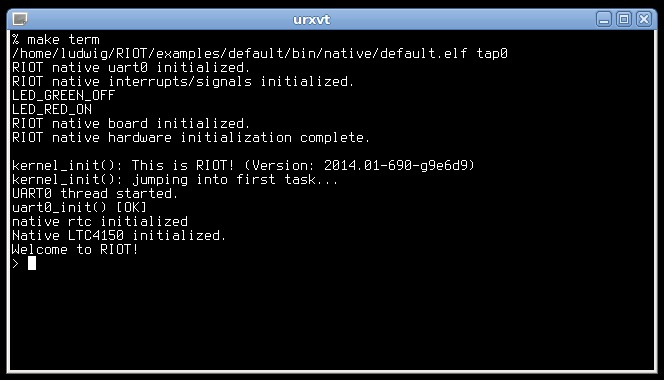
The RIOT native boards use system calls and signals to emulate hardware at the API level. That means that you can compile the complete RIOT software stack for your *NIX system and run it as a process. Reasons why you might want to do that are:
- You want to try out RIOT but don't have one of the supported hardware platforms
- You are developing an application for RIOT or you are hacking on RIOT itself and want to test and debug without the limitations and requirements of debugging on actual hardware
- You want to experiment with network protocols in a controlled environment
Two different boards are currently available, depending on the host platform: @ref boards_native32
and @ref boards_native64. Using BOARD=native will automatically select the right variant.
Hardware
- CPU: Host CPU
- RAM: Host RAM
- Flash:
- for program execution: Host file system
- for the @ref drivers_periph_flashpage : emulated in RAM
- Network: Tap Interface
- UART: Runtime configurable -
/dev/tty*are supported - Timers: Host timer
- RTC: host time at
UTCfor consistent behavior with embedded systems. The environment variableTZcan be used to explicitly set a specific or hosts timezone (see below). - LEDs: One red and one green LED - state changes are printed to the UART
- PWM: Dummy PWM
- QDEC: Emulated according to PWM
- SPI: Runtime configurable -
/dev/spidev*are supported (Linux host only) - GPIO: Runtime configurable -
/dev/gpiochip*are supported (Linux host only)
Configuration
Some aspects of a native RIOT instance can be configured at runtime.
To get an overview invoke the program with the -h option. Example:
$ examples/basic/default/bin/native64/default.elf -h
usage: examples/basic/default/bin/native64/default.elf <tap interface 1> [-i <id>] [-d] [-e|-E] [-o] [-c <tty>] [-g <gpiochip>] [-i <id>] [-d] [-e|-E] [-o] [-c <tty>] [--eui64 <eui64> …]

help: examples/basic/default/bin/native64/default.elf -h

Options:
    -h, --help
        print this help message
    -i <id>, --id=<id>
        specify instance id (set by config module)
    -s <seed>, --seed=<seed>
        specify srandom(3) seed (/dev/random is used instead of random(3) if
        the option is omitted)
    -d, --daemonize
        daemonize native instance
    -e, --stderr-pipe
        redirect stderr to file
    -E, --stderr-noredirect
        do not redirect stderr (i.e. leave sterr unchanged despite
        daemon/socket io)
    -o, --stdout-pipe
        redirect stdout to file (/tmp/riot.stdout.PID) when not attached
        to socket
    -c <tty>, --uart-tty=<tty>
        specify TTY device for UART. This argument can be used multiple
        times (up to UART_NUMOF)
    -g <gpio>, --gpio=<gpio>
        specify gpiochip device for GPIO access.
        This argument can be used multiple times.
        Example: --gpio=/dev/gpiochip0 uses gpiochip0 for port 0
    -U <eui64>, --eui64=<eui64>
        provide a ZEP interface with EUI-64 (MAC address)
        This argument can be provided multiple times
    -w <tap>
        Add a tap interface as a wireless interface
As with any platform, you can specify the sizes of your stacks, i.e. the amount of space your application can use.
You may wish to use a more realistic stack size than native's THREAD_STACKSIZE_DEFAULT to increase realism.
Setting a timezone
RIOT native defaults to UTC timezone if TZ is not set in the environment,
to keep behavior of time.h functions like mktime consistent with embedded setups,
which usually do not use timezones.
If your application requires the same timezone as host, the TZ environment variable should be set accordingly.
There are several ways to achieve that:
- execute
export TZ=":/etc/localtime"priormake termin the very shell you intend to runmake termin - add
export TZ=":/etc/localtime"to your~/.profile - run
TZ=":/etc/localtime" make term
The timezone can also be set at runtime by the application for both native and embedded devices using setenv("TZ", <timezonestring>, 1). picolibc and newlibc expect <timezonestring> to have the form NAME+/-hh:mm:ss<DST-handling> (+ pointing west -> CET-1 adds 1 hour to UTC, see man timezone)
e.g., ACST-9:30ACDT-10:30,M10.1.0,M4.1.0.
If the TZ-string can not be interpreted by the used libc (newlib,picolibc,glibc),
they default back to UTC.
@warning Some things will behave faulty, since the assumption of most pkgs and
system modules is to run on a embedded system with no timezone set.
One often used function that respect timezone setting is mktime
Known Issues
Check the list of open issues labeled native in the github issue tracker